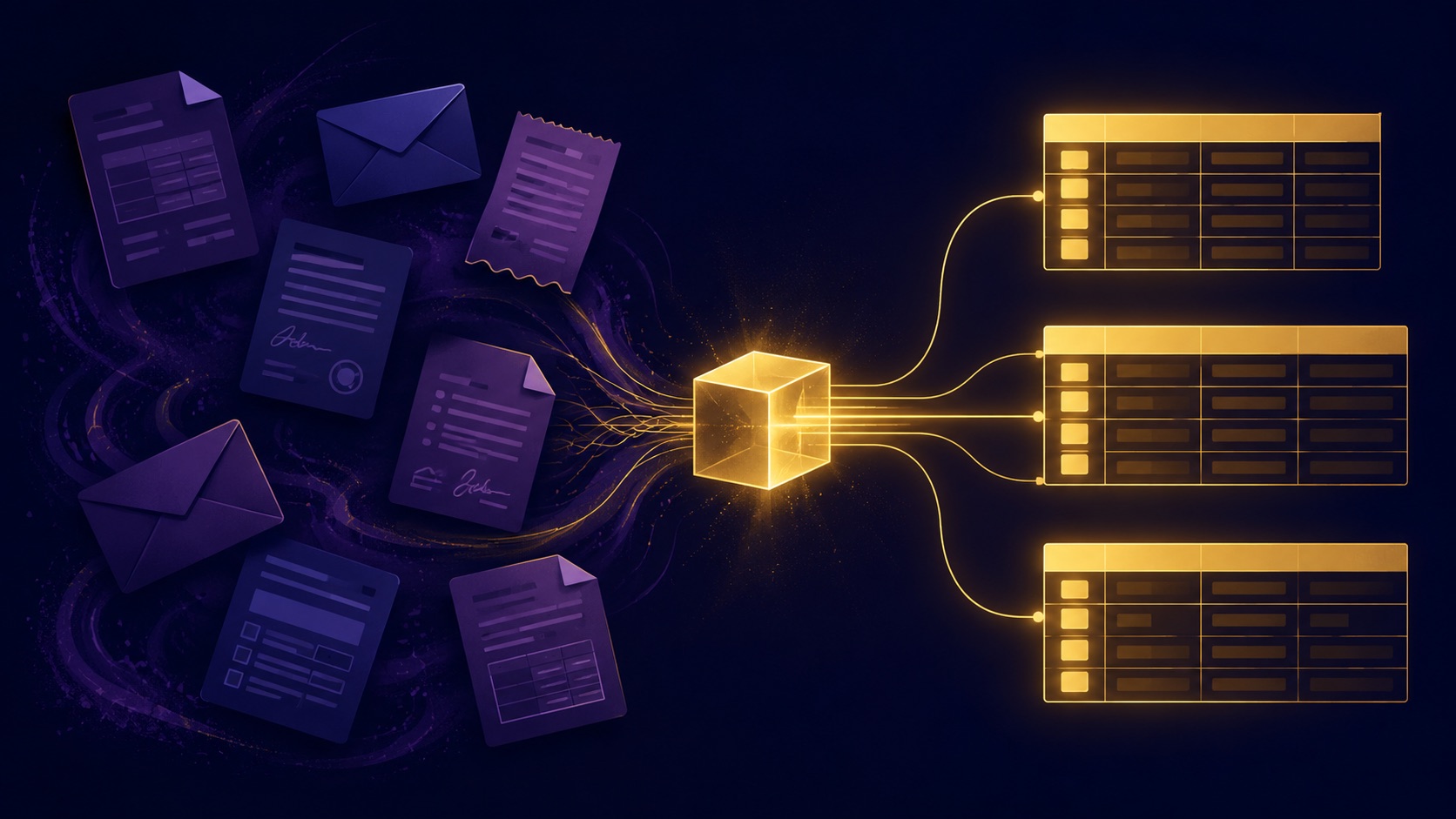
Nearly half of enterprises point AI agents at data entry and extraction, and most still cannot get it into production. The missing piece is not intelligence. It is the data layer, and with Alani Insights you can have it running this week.
Listen: Use Case: Data Entry and Extraction, Solved (11 min)
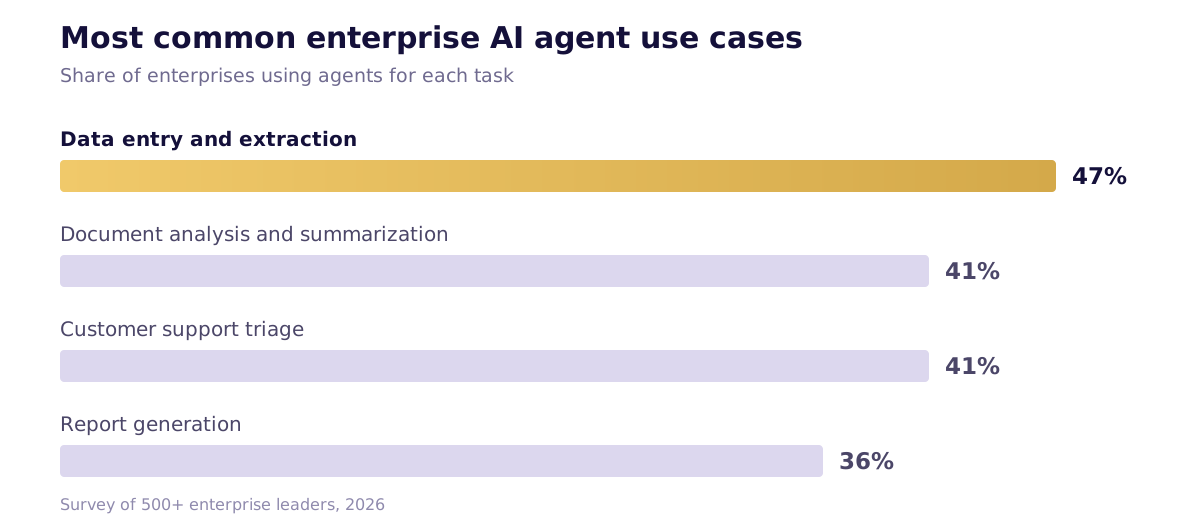
Zapier's 2026 survey of more than 500 enterprise leaders found that the most common AI agent use case across every department is data management. Forty-seven percent of enterprises now use agents for data entry and extraction, ahead of document analysis and summarization (41%), customer support triage (41%), and report generation (36%) [1].
The demand is obvious. Every organization generates a constant stream of unstructured inputs: emails, meeting transcripts, invoices, contracts, statements, forms, support tickets. Someone has to turn that stream into records, and that someone has historically been a person doing copy-paste work. It is slow, error-prone, and expensive. The ROI of automating it is easy to measure: McKinsey estimates that adding agents to existing workflows delivers 20 to 40 percent time savings and a 30 to 50 percent reduction in backlog, even before processes are redesigned around them [2].
So why is the most common use case still an unsolved problem at most companies?
Why extraction is harder than it looks
Reading a document is the easy part. Any frontier model can look at an invoice and tell you the vendor, the amount, and the due date. The hard parts are everything that happens after.
The schema problem. Extraction requires a target. What fields, what types, what naming conventions, what relationships between records. Most organizations have never formally defined what a clean record looks like. The model can only be as structured as the destination you give it, and most teams do not have a destination.
The reconciliation problem. Extraction is not a one-time event. It runs on Monday, and again on Tuesday, and Tuesday's records need to be checked against Monday's. Is this contact already in the system? Is this a duplicate invoice or a second installment? Answering that requires comparing new data against the full existing dataset. Extraction without reconciliation just produces a faster mess.
The exception problem. Real-world documents are dirty. Layouts change, fields are ambiguous, amounts conflict. A production system needs confidence scoring, a review queue for uncertain records, and an audit trail of what was changed and why. A wrong answer written confidently into your books is worse than no automation at all.
The volume problem. One invoice fits in a prompt. Hundreds of transaction lines, checked against twelve months of prior records, do not fit in a conversation. Production extraction is a batch process against a database, not a chat exchange.
Why a chat window alone cannot solve it
Anthropic's 2026 State of AI Agents report found the top blockers to agent adoption are integration with existing systems (46%) and data access and quality (42%) [3]. The bottleneck is not model intelligence. It is infrastructure.
A standalone chat session with a frontier model has three structural limits for this job:
No persistence. The conversation ends and the work evaporates. Deduplication is impossible when the model cannot see what was extracted last week. State is the entire value of this workflow, and a chat window has none.
No canonical store. The workflow needs an authoritative system of record: durable tables with defined schemas that every run reads from and writes to. Pasting extracted output back into spreadsheets by hand reintroduces the exact manual labor you were trying to eliminate.
No write path. The output has to land somewhere programmatically: created as rows, merged with existing records, logged. Without a database the agent can write to directly, a human becomes the integration layer, and the human is the bottleneck again.
The model is the solved half. What it cannot supply is the data layer itself.
Why the usual workarounds fall short
Most teams already sense this, which is why the extraction workflow typically lives in Excel, Google Sheets, Notion, or Airtable today. Each of these is a real improvement over a folder of PDFs. None of them is a data layer an agent can depend on.
Spreadsheets were never built to serve as a data layer for AI agents. Agents need structured, relational data they can query reliably, not a flat grid where context lives in cell references and color-coded columns. There is no schema enforcement, so a date column happily accepts text. Version control gets messy, permissions lack rigor, and there is no audit trail of what an agent did and why. Even Airtable, whose business depends on replacing spreadsheets, makes exactly this argument [4].
Notion is a document workspace with databases bolted on. Its own API documentation sets the limits: rich text fields cap at 2,000 characters, requests are rate limited to an average of three per second, and payloads max out at 1,000 blocks [5]. It is excellent for knowledge work. It is not a system of record for high-volume structured data.
Airtable is closer, because it is genuinely relational. But it is a workspace designed for humans first, with hard ceilings that agents hit quickly: record caps per base by pricing tier (50,000 on Team, 125,000 on Business), API rate limits of five requests per second, and credit-based limits on its AI features [6] [7]. It also only works on data inside Airtable, so information living anywhere else must be imported and synchronized first, creating duplication and consistency problems.
The common thread: these tools give you a place to put data, but not a database built for an agent to reason over. The schema is implicit, the limits are structural, and the context an agent needs to work autonomously lives in people's heads.
How Alani Insights solves it
Alani Insights was built for exactly this gap. It gives every organization its own dedicated SQL database: durable, extensible, relational tables with real schemas, not rows in a shared workspace with plan-tier ceilings.
Here is what it looks like end to end.
You tell Alani: "I need to track vendors, invoices, and payments." Alani creates a Vendors table, an Invoices table, and a Transactions table, linked, with fields defined and described. You look at the structure and say "add a due date and an approval status, and invoices should link to the bank transaction that paid them." The schema updates. Then you connect your sources: the inbox where invoices arrive, the bank feed. The agent reads each incoming invoice, extracts the vendor, amount, and terms, checks the tables for existing entries, matches payments to invoices, merges duplicates instead of creating them, and flags anything ambiguous for your review. New invoices and transactions flow in as they happen, and every sync runs against everything that came before.
The same pattern holds whatever your stream is. RFPs arriving by email become structured opportunity records. Intake forms become case files. Signed contracts become obligations with renewal dates. The domain changes; the workflow does not. That is the entire workflow the first half of this post says most companies cannot build, applied to whichever stream is drowning your team.
We know because we run bundleIQ on it. Our own contacts, deal pipeline, meeting notes, and bank transactions live in Alani Insights tables, maintained by AI agents. In one run, an agent reconciled our entire paying customer list against our existing contact tables, creating 427 net-new records and merging the overlaps, work that would have taken days by hand.
Under the hood, four things make this work:
You talk your schema into existence. No database admin tools. You describe what you are tracking in plain language, Alani creates the tables, and you refine the structure conversationally: ask what fields exist, whether the schema captures what you need, where the gaps are. The schema problem stops being a prerequisite and becomes part of the conversation.
The context is built into the tables. Each table carries its own definitions: what the fields mean, how records relate, what a valid entry looks like. When an agent connects, it does not guess where data goes. It reads the schema, knows exactly which table to write to and how to format the record, and checks existing rows before creating new ones. The destination teaches the agent how to file things.
Agents read and write directly through MCP. Every table is exposed to AI agents through the Model Context Protocol, the open standard for connecting models to data. Search, dedupe, create, update, log, all programmatically. No human as the integration layer.
Provisioning data is part of the product, and it is connection-based, not import-based. Exporting CSVs and re-importing them is a one-time chore, not a system, and it is stale the moment it finishes. Alani connects to your live sources through their APIs, so payment records, contacts, and transactions flow into the tables continuously. A one-time historical backfill seeds the tables with your real history; the ongoing sync keeps them true. Reconciliation against twelve months of prior records only works if those twelve months are in the tables and current.
Could you just build this yourself?
If you are technical, you have probably already had the thought: spin up Postgres, point an MCP server at it, done. And yes, that gets you a database an agent can reach.
What it does not get you is everything around the database. You would still be designing schemas by hand, writing and maintaining the table descriptions that give agents their context, building import and reconciliation tooling, managing permissions and audit logging, and keeping the MCP layer current as the standard evolves. That is a data engineering project with ongoing maintenance, and the person who wanted to automate invoice entry has now become a database administrator.
Alani Insights is that whole stack pre-assembled: the database, the conversational schema layer, the agent context, the provisioning tools, and the MCP connection, managed for you. The build-it-yourself path is real. It is just a different job than the one you were trying to do.
The bottom line
The most common enterprise agent use case is not blocked on smarter models. It is blocked on the data layer: a structured, persistent, agent-accessible system of record for extracted output to land in. Spreadsheets and workspace tools were not built for that job. Alani Insights was.
Alani Insights by bundleIQ gives your organization its own SQL database that AI agents read from and write to through MCP. Talk your tables into existence, provision your data, and put the most common agent use case into production.
Sources
- Zapier. "State of Agentic AI Adoption Survey." Survey of more than 500 enterprise leaders, 2026.
- McKinsey & Company. "Seizing the Agentic AI Advantage." 2025.
- Anthropic. "The 2026 State of AI Agents Report." Survey of more than 500 technical leaders, conducted with Material.
- Airtable. "10 Best Google Sheets Alternatives for Businesses in 2026."
- Notion. "Request Limits." Official API documentation.
- Airtable. "Airtable Plans." Official plans documentation.
- Airtable. "Using Airtable AI in Fields." Official support documentation.


Ready to put your information to work?
Pick a product. Start free or talk to our team.