Data model
Three tables are in use. The workspace was started from the Insights CRM template, which also created Opportunities and Activities tables; the site does not use them and they are empty.
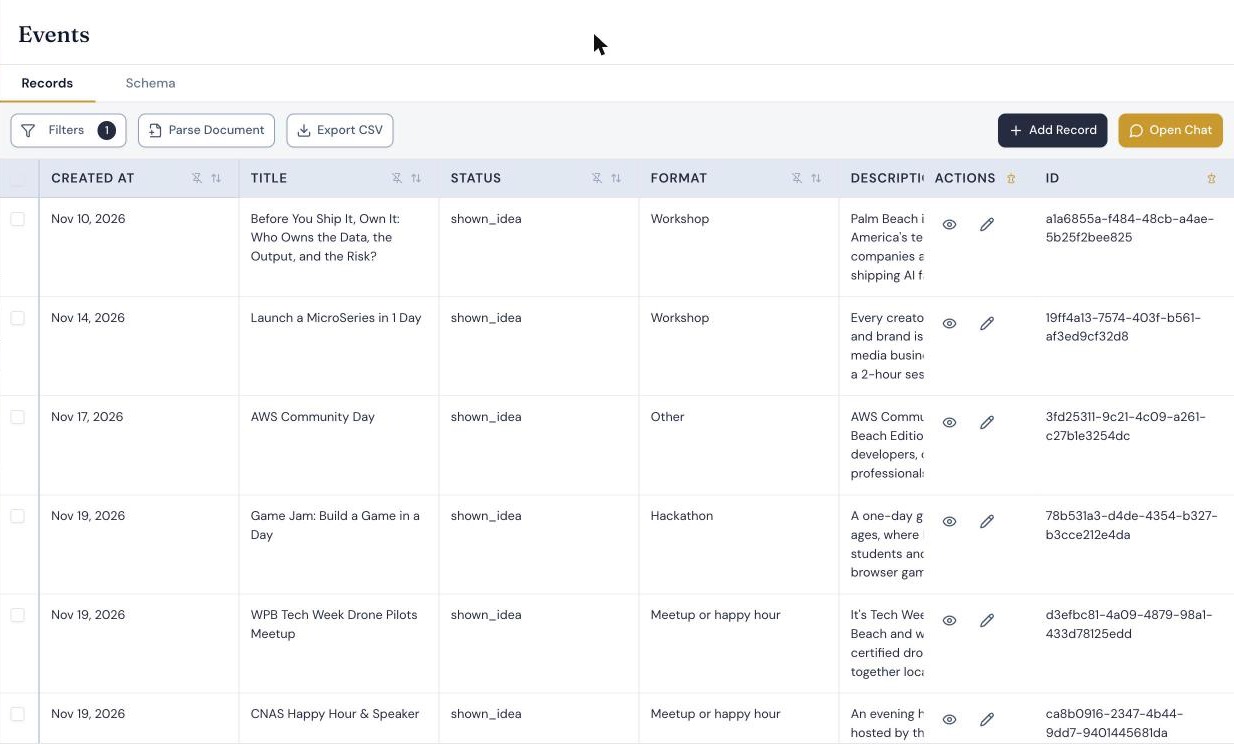
Events
One record per proposed event. 32 fields including id and created_at. Every field the site writes is type text.
| Field | Set by | Used for |
|---|---|---|
title |
Form | Public |
status |
Form at creation, then the dashboard | The whole workflow. See status values |
source |
Form | pbtechweek.com/host or pbtechweek.com/calendar. The site ignores records with any other value |
description |
Form | Public, shortened to 400 characters |
organization |
Form | Public, as the host |
preferred_day |
Form | Text such as Tue Apr 13, or TBA. The calendar parses the day number out of it |
start_time, end_time |
Form | HH:MM, or TBA. Idea records hold a part of the day in start_time: Morning, Midday, Afternoon, Evening |
venue_status, venue_name, venue_address |
Host form | venue_name is public once confirmed |
registration_url |
Host form | Public once confirmed, and only if it is an http or https link |
format, audience, partners, capacity, admission, placeholder_copy, host_notes, backup_day |
Host form | Review only |
listing_consent |
Form | yes when the submitter agreed to a public listing |
host_name, host_email |
Form | Private. Never rendered on a public page |
host_person_id, company_id |
Function | The ids of the linked People and Companies records, stored as text |
fit_score, fit_verdict, fit_reason, fit_model |
Function, from the scoring call | Sorting and context in the review queue. Nothing else |
review_notes |
People, in the Insights app | Internal notes |
People
The CRM template’s People table plus four fields added for the site: interest, source, tags and email_opt_in. One record per person, matched by email. Newsletter signups, hosts, idea submitters and contact-form senders all land here, distinguished by comma-separated tags such as newsletter, host, idea, contact. A contact-form message is appended to the person’s notes.
company_id on People is a real foreign-key field pointing at Companies.
Companies
The template’s Companies table plus org_type and source. One record per host organization, matched by name.
Relationships
Companies  <-- People.company_id (foreign key)
People     <-- Events.host_person_id (text holding an id)
Companies  <-- Events.company_id     (text holding an id)
The two links from Events are text fields that hold the id of the linked record.
Status values
status |
Set by | Meaning |
|---|---|---|
submitted |
Host form | Waiting for review. Not public |
idea |
Idea form | Waiting for review. Not public |
shown_idea |
Dashboard: Show as idea | On the public calendar as an idea: proposed, not yet a confirmed event |
confirmed |
Dashboard: Confirm | On the public calendar as a confirmed event |
hidden |
Dashboard: Hide | Never shown publicly |
Restore sets a hidden record back to idea or submitted, depending on which form created it.
How a submission is written
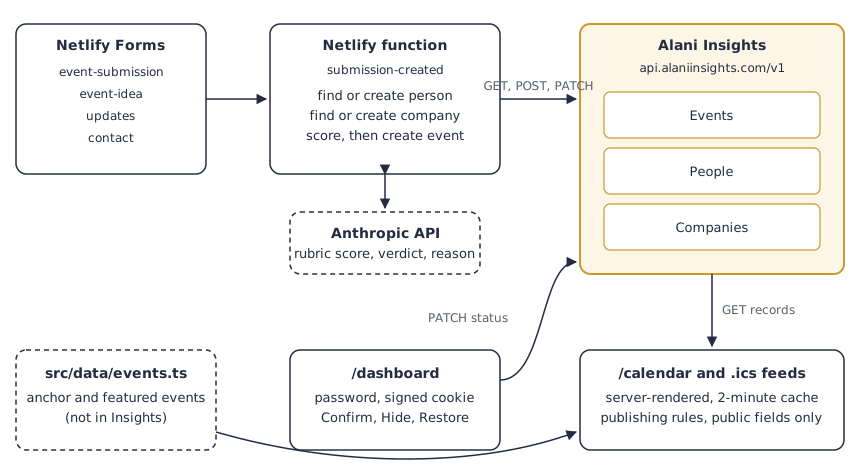
The function receives Netlify’s submission payload and makes these calls. {events}, {people} and {companies} stand for table ids, which the function looks up once by name.
GET  /v1/tables
GET  /v1/tables/{companies}/records?name=<organization>&modifiers[limit]=1
POST /v1/tables/{companies}/records                        (if not found)
GET  /v1/tables/{people}/records?email=<email>&modifiers[limit]=1
POST /v1/tables/{people}/records                           (if not found)
PATCH /v1/tables/{people}/records/{id}                     (if found: merge tags, append a note)
POST /v1/tables/{events}/records
A person or an organization matches only when the value is equal after trimming and ignoring capitals. The lookup asks for the value as typed; if nothing comes back it fetches up to 25 candidates with a case-insensitive search and accepts one only on that exact comparison. Otherwise it creates a new record. Emails are stored trimmed and lowercased.
Every request carries the header x-api-key. The event record for a host submission looks like this, with synthetic values:
{
  "title": "Robotics Lab Open House",
  "status": "submitted",
  "source": "pbtechweek.com/host",
  "format": "Lab or facility tour",
  "description": "Tour a working robotics lab and watch three student teams demo their builds.",
  "preferred_day": "Tue Apr 13",
  "start_time": "17:30",
  "end_time": "19:30",
  "venue_status": "Have a venue",
  "venue_name": "Engineering Hall",
  "organization": "Example Coast University",
  "host_name": "Dana Whitfield",
  "host_email": "dana.whitfield@example.edu",
  "host_person_id": "<id of the People record>",
  "company_id": "<id of the Companies record>",
  "listing_consent": "yes",
  "fit_score": "8",
  "fit_verdict": "strong",
  "fit_reason": "A real lab opening its doors, with demos from named teams.",
  "fit_model": "claude-haiku-4-5"
}
Three details matter if you copy this:
- Only known, non-empty fields are sent. Empty values are dropped before the request, and the function writes only fields that exist as columns, so the function and the table’s columns change together.
- Scoring cannot block the write. If the model call fails or no model key is set, the record is saved with
fit_verdictset tounscoredand the reason. A separate script backfills scores later. - The function always returns success to Netlify. A failure is logged, and the submission is still in Netlify Forms to replay by hand.
How the public calendar reads
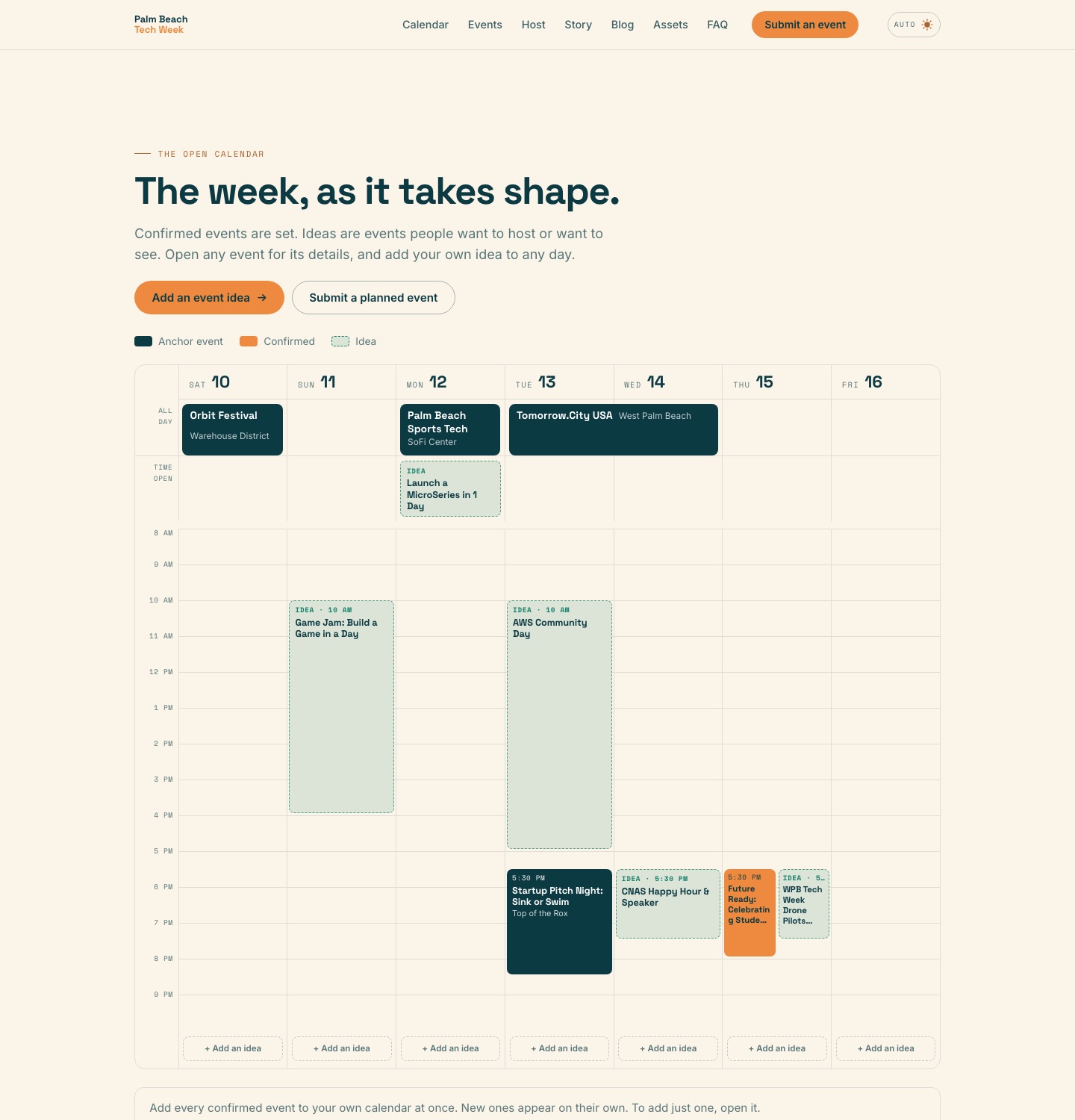
/calendar is rendered on the server for each request. It reads the whole Events table, 500 records per page:
GET /v1/tables/{events}/records?modifiers[limit]=500&modifiers[offset]=0Pagination uses modifiers[limit] and modifiers[offset].
The result is held in memory for two minutes per function instance. If the request fails, the page uses the last good copy, and if there is none it renders the anchor and featured events from the repository file. The page does not depend on Insights being reachable.
Reading the table once and filtering in code keeps it simple: one request, one cached result, and every rule in one place.
Filtering happens in the site’s code after the read, not in the query:
- Keep records whose
sourceis one of the two forms. - Drop records already featured in the repository file.
- Publish as an idea: a record with status
shown_idea, which only the dashboard sets. Records still waiting, with statussubmittedoridea, are never published. - Publish as confirmed: a record with a confirmed status. A host submission, shown either way, also needs the submitter’s consent to a listing.
- Reduce every published record to title, day, time, description and organization. A confirmed record also gets its venue name and registration link, and only confirmed records go into the
.icsfeeds.
Nothing a visitor submits reaches the calendar until a person has looked at it. The model’s score orders the review queue and does nothing else. It is not moderation and it is not a security control, and no publishing rule reads it.
How approval works
/dashboard lists what is waiting, sorted by fit_score, with the model’s reason beside each item. Each button posts a record id and a target status. The server then:
- Fetches the record and refuses to continue unless its
sourceis one of the two forms. - Sends one request:
PATCH /v1/tables/{events}/records/{id}with{"status": "confirmed"}(orshown_idea,hidden,idea,submitted). - Clears the calendar’s in-memory copy so the change shows on the next request.
That is the entire approval system: one field, five values, one PATCH.
Authentication and permissions
- One API key. It is stored as an environment variable on the hosting platform and read only by server-side code. It is not in the repository and never reaches a browser.
- The site’s code is the gatekeeper for the public. Visitors never talk to Insights. They post a form, and the function decides what gets written.
- The dashboard has its own sign-in. A shared password, a signed session cookie that lasts eight hours, a lockout after five wrong attempts from one address, and headers that keep the page out of search and out of frames. Insights is not involved in that sign-in.
- Organizers who use the Insights app sign in to Insights separately and can edit any record in the workspace there.
How people work with the data
- In the dashboard, for the routine decision: show as an idea, confirm, or hide.
- In the Insights app, for anything else: fixing a title, adding
review_notes, merging a duplicate organization, or adding a record by hand. One event in the table was entered by hand rather than through a form. - Through the API, for maintenance scripts such as the score backfill.
Agents and MCP
Alani Insights has a remote MCP server that exposes the same tables to assistants such as Claude and ChatGPT, with tools to list tables, describe a table, and search, create, update and delete records. Because the Events table carries written descriptions of its fields and status values, an assistant connected to this workspace would have what it needs to answer “what is waiting for review?” or to change a status.
The deployed site uses REST only, and no agent takes part in the workflow.
Results
As of November 21, 2026:
- The submission path has run in production since October 2026. Netlify recorded 8 host submissions and 36 newsletter signups, and the workspace holds 8 host-form event records and 36 people whose source is the newsletter form.
- Seven of the eight host submissions were scored by Claude Haiku 4.5 at submission time and the first one by a different Claude model, before the model was changed. The verdicts were four strong, three maybe and one weak.
- A submission is public only after an organizer shows or confirms it on the dashboard. An organizer has approved six of the eight as ideas and hidden one.
- The site code that talks to Insights is about 170 lines for reading and status changes, and about 215 lines for the submission function.
Reproduce the pattern
The pattern is four parts, and none of them is specific to events:
- A form handler that writes one described record per submission, with a starting status.
- A table where one field carries the workflow.
- A page that reads the table and applies explicit publishing rules in code.
- A protected action that changes the status.
examples/event-platform in our public examples repository runs all four parts against synthetic data, in about 200 lines of Python with no dependencies. It creates the tables with field descriptions, files seven submissions without duplicates, prints the review queue, lets a reviewer confirm one, show two as ideas and hide one, and writes the public view. Before any review, nothing is public. It uses a keyword rule where the real site calls a model, and foreign keys where the real site stores ids as text. The repository is MIT licensed.
You can build the same thing on any store that gives you an HTTP API and a way for people to see the rows. What to look for: can a server function write to it without a driver, can non-developers open and edit the records, and does the schema carry enough description that the next person, or an assistant, can read it without asking you.
Related
- Runnable example on GitHub
- Alani Insights overview
- Alani Insights MCP server: the endpoint, sign-in and tools
- Technical reference: REST endpoints, query parameters and safe-write rules
- How the organizers describe the build
- The live calendar
Questions about this implementation: hello@bundleiq.com